


SMS Opt-In Consent Evidence
1. Campaign Overview
Basic information about the messaging program.
| Business Name | Switzer Enterprises |
| Business Phone | 707-451-1600 |
| Website | https://switzerenterprises.com |
| Message Type | Transactional — service status updates, repair notifications, pickup alerts, appointment reminders |
| Message Frequency | Varies based on service status. Typically 2–5 messages per service request. |
| Opt-In Method | QR code → digital service intake form (described in detail below) |
| Opt-In Required? | No — SMS consent is optional. Customers receive service regardless of whether they opt in. |
2. Complete Opt-In Flow — Step by Step
This is the end-to-end process a customer goes through to opt in to SMS messages.
- 1. Customer visits Switzer Enterprises for service: Customer brings a device to our Vacaville location for repair or IT service. A QR code is displayed at the service counter.
- 2. Customer scans the QR code: Scanning opens the digital service intake form in the customer's mobile browser at https://crm.switzerenterprises.net/sms-opt-in-demo.html
- 3. Customer fills out the intake form, The form collects: name, phone number, email address, device type, and description of the issue. All fields are standard service intake — not gated behind SMS consent.
- 4. Customer sees the SMS consent checkbox: Near the bottom of the form, before the submit button, is a clearly labeled SMS consent checkbox. It is not pre-checked. The customer must actively check it to consent. See exact checkbox language in Section 3 below.
- 5. Customer submits the form: If the customer checked the SMS consent box, their phone number is enrolled to receive transactional service notifications. If they did not check it, they receive no SMS messages.
- 6. Customer may opt out at any time: Every message sent includes "Reply STOP to opt out." Customers can also reply HELP for assistance. Opt-out is processed immediately.
3. Exact Consent Language Shown to Customer
This is the verbatim text of the SMS consent checkbox as it appears on the intake form. The checkbox is unchecked by default.
✓ Checkbox is NOT pre-checked · ✓ Consent is optional · ✓ Includes frequency disclosure · ✓ Includes rates disclosure · ✓ Includes STOP and HELP instructions
4. Screenshots of the Intake Form
The following screenshots show the intake form as a customer sees it on their mobile device after scanning the QR code. (click to expand)
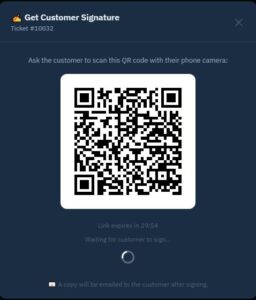 QR Code at Counter | 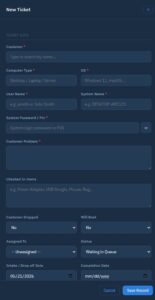 Intake Form | 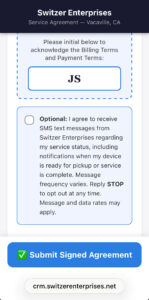 SMS checkbox — unchecked | 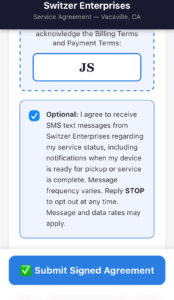 SMS checkbox — checked |
5. Sample Messages
Representative examples of messages sent to customers who have opted in. All messages identify the sender by name and include opt-out instructions.
6. Opt-Out and Help Handling
| STOP keyword | Immediately removes the customer from all future messages. Confirmation sent: "You have been unsubscribed from Switzer Enterprises SMS notifications. No further messages will be sent." |
| HELP keyword | Auto-reply with support contact: "Switzer Enterprises: For assistance call 707-451-1600 or visit switzerenterprises.com. Reply STOP to unsubscribe." |
| Message frequency | Varies. Typically 2–5 messages per service request based on repair status changes. |
| Rates disclosure | Message and data rates may apply — included in consent checkbox and initial message. |
7. Privacy Policy & Terms of Service
Both documents are publicly accessible and include SMS-specific language.
8. Contact for Compliance Questions
| Business | Switzer Enterprises |
| Address | Vacaville, CA |
| Phone | 707-451-1600 |
| Website | https://switzerenterprises.com |
| Document prepared | May 2026 |